Free · No Registration · WYSIWYG

LnxEffect
LED Lighting Control Suite

From Fixture Modeling to Light Shows, All in One

Covers the complete workflow of fixture management, spatial patching, effect creation, and device management, making creative lighting accessible. Supports CAD drawing patch, Madrix patch import, ArtNet protocol, and multiple effect layers including video, image, and text.

4
Core Tools
Effect Layer Overlays
ArtNet
Protocol Support
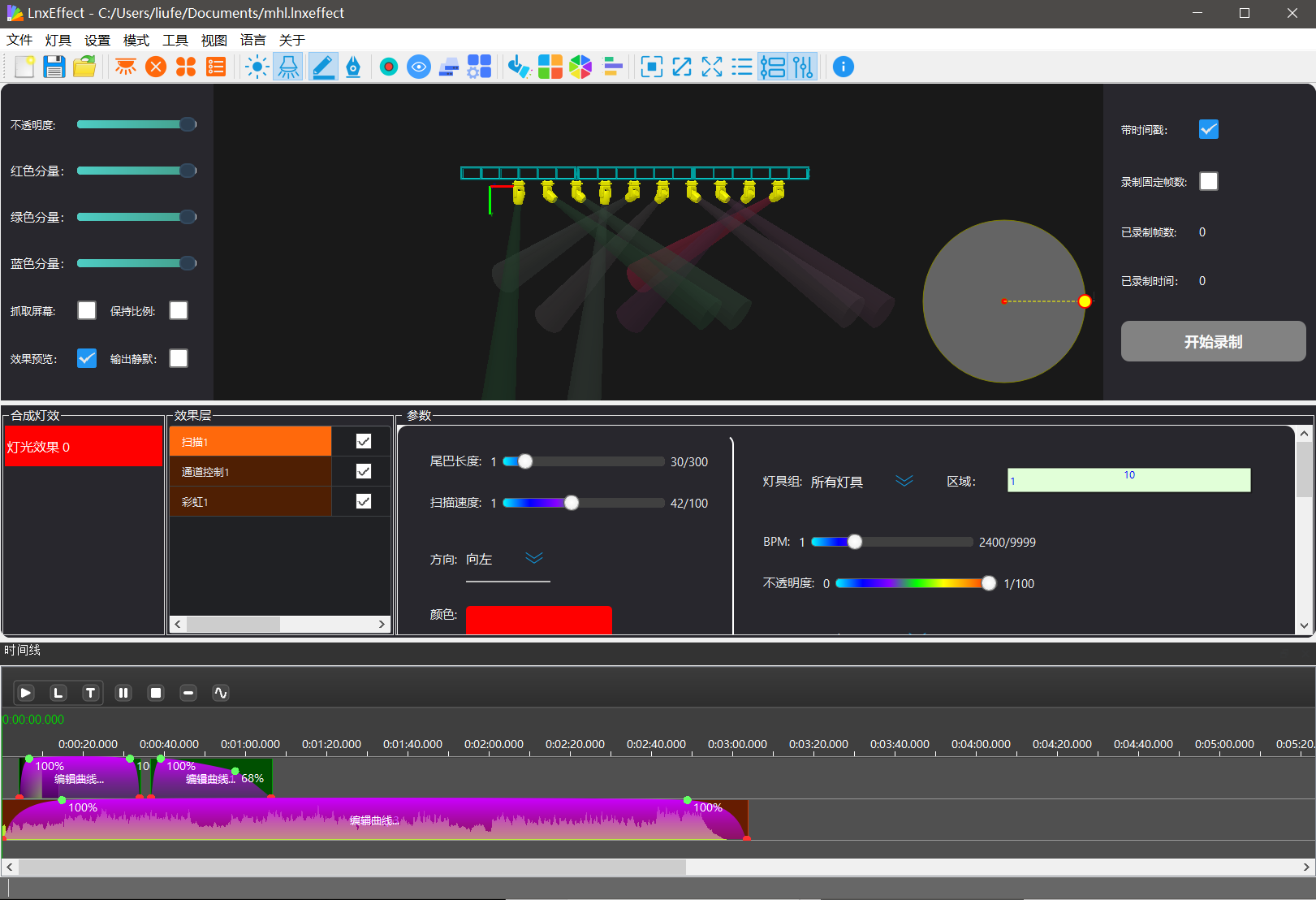
LnxEffect Interface Preview
Multi-Effect Layer Compositing
Real-Time Output Preview

One Suite,
Full Lighting Control

LnxEffect Lighting Software Suite is a free, no registration required WYSIWYG LED lighting control software developed by Linx Technology. From fixture model creation, spatial patching, effect authoring to device management, all tools are integrated in one software — no need to switch between multiple applications.

CAD/Madrix Patch Support
ArtNet Protocol
Buildin/Video/Image/Text Layers
Fixture Management

Create and manage various fixture models

Spatial Patching

2D/3D fixture position layout

Effect Creation

Multi-effect layer compositing and editing

Device Management

Centralized management of Linx devices

Four Core Tools, Seamless Collaboration

From start to finish, a complete lighting project in just four steps. Each tool focuses on one task, combining to form a full workflow.

LnxFixtureEditor

Fixture Editor

Create and manage fixture models, define channel counts, types, and control parameters. Supports pixel RGB lights, multi-channel moving heads, and various fixtures.

  • Edit existing fixture properties
  • Quickly create new fixtures
  • All channel parameters adjustable

LnxPatcher

Fixture Patcher

Import fixture models and place them onto the stage or scene according to actual installation positions, completing DMX address assignment and physical location mapping.

  • DXF/DWG file import
  • Madrix patch import/export
  • Marquee select & drag for quick adjustments

LnxEffect

Effect Creation Core

The core effects engine creates rich lighting effects using the timeline and color editor. Supports frame-by-frame editing, real-time preview, and WYSIWYG.

  • Multi-effect layer compositing
  • Video/GIF/Text effect layers
  • Recording & frame editing

LnxManager

Device Manager

One-click search for all Linx devices on the local network, centralized management of lighting file uploads and downloads, and supports remote firmware upgrades.

  • Search for network devices
  • Upload/download lighting effect files
  • Remote firmware upgrade

Four Steps to Lighting Project

From fixture modeling to device playback, a clear workflow makes it easy for everyone to get started.

STEP 01

Select or Create Fixture Model

Use LnxFixtureEditor to create or manage fixture models, define channel counts, types, and control parameters. Supports pixel lights, moving heads, and various fixtures.

STEP 02

Wire & Place Pixel/Stage Lights

In LnxPatcher, place fixtures onto the stage or scene and complete DMX address assignment. Supports DXF import and Madrix patch compatibility.

STEP 03

Design & Create Lighting Effects

Import the patch file into LnxEffect and use the timeline and color editor to create rich lighting effects. Supports video, GIF, and text effect layer overlays.

STEP 04

Offline Device Playback

Use LnxManager to send lighting effect files to the controller, supporting DMX channel switching playback and scheduled auto-play. Set it and forget it.

Powerful Features, Easy Creation

LnxEffect provides lighting designers and engineers with rich creative tools to let your creativity run free.

Multi-Effect Layer Compositing

Add multiple effect layers for overlay compositing, each with independently adjustable parameters, to create complex and brilliant lighting effects.

Video/Image/Text Layers

Supports video file playback, video capture input, screen capture effects, GIF effects, and text effect layers — rich sources for effects.

Timeline Editing

Timeline-based lighting effect editing, precisely controlling the lighting performance at each time point to create dynamic light shows.

Recording & Frame Editing

Real-time recording of lighting effect output, supports frame-by-frame editing, defining in/out points, deleting specific frames, and fine-tuning every detail.

Madrix Compatibility

Supports importing and exporting Madrix patch data, making it easy to migrate from other platforms and reducing switching costs.

ArtNet Real-Time Output

Lighting effects output to controllers in real-time via Ethernet, supports recording ArtNet data for offline device playback.

See Effect Demos

Experience the powerful lighting effect creation capabilities of LnxEffect firsthand.

LnxEffect Lighting Effect Creation Demo
LnxEffect Recording Demo
LnxEffect Recording Frame Editing
LnxManager Device Management Demo

Wide Compatibility, Seamless Integration

LnxEffect supports multiple industry-standard protocols and formats, seamlessly integrating into your existing workflow.

ArtNet-4
DXF/DWG Import
Madrix Compatible
DMX512
LRF Effect Files
Video/GIF/Image

Start Your Lighting Creation Journey

Download LnxEffect for free, no registration required. Experience the complete lighting workflow from design to playback instantly.

Free to Use  ·  No Registration Required  ·  Continuous Updates